
Wellesley Public Schools is pleased to offer Wellesley Middle School parents and caregivers access to the Lightspeed Parent Portal. This free service provides greater visibility, control, and oversight of your student’s district-assigned iPad during hours outside of the school day.
While the Lightspeed Filter continues to block inappropriate online content at school and at home, the Parent Portal allows you to monitor and manage after-school internet activity directly. This tool is intended to supplement the existing limits and oversight you establish for your home internet connection and personal devices.
Important Update: **Please note that the custom controls that are built into the Lightspeed Parent Portal will replace the current 11 pm Internet cutoff for Wellesley Middle School iPads. If you choose to take no action, filtered Internet access will remain active at all times.
Lightspeed Parent Portal Control Hours:
Weekdays – 2:45 PM to 6:00 AM (Following Day) Weekends – All Day
The Lightspeed Parent Portal is a free service that provides parents and guardians with visibility and control over their student’s Internet usage on their district-issued iPad outside of school hours. It serves as a supplement to the limits and oversight you establish on your home internet connection and personal devices.
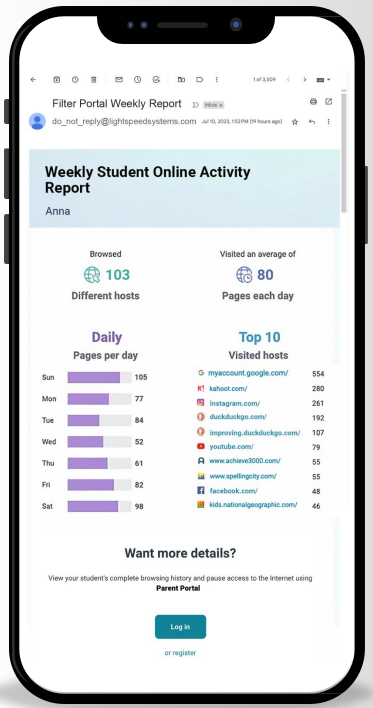
Parents and caregivers will receive a welcome email from Lightspeed Systems (from do_not_reply@lightspeedsystems.com) by October 1, 2026, prompting you to sign up for an account. If you do not see this email in your inbox, please check your spam or junk folder.
Alternative Methods:
Go to https://wellesley.portal.relay.school and select Create account. Fill out the information and make sure you use the email address that is on file with the schools. If your email address matches the information in our student information system, you will be able to create your account.
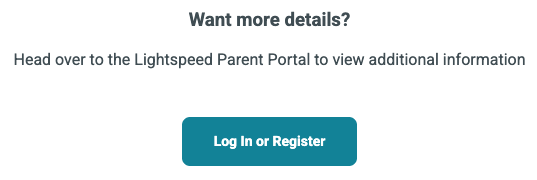
You will receive a Weekly Student Online Activity Report email from the portal. Click the “Login In or Register” link at the bottom. This email is from do_not_reply@lightspeedsystems.com and you may need to check your SPAM or Junk Folder if you don’t see it.
Through the portal, you can view your student’s recent web activity on their district-issued iPad, see which websites were allowed or blocked by the district’s Internet filter, and receive weekly email summaries of their online activity.
Parental controls configured in the portal apply only during hours outside of the school day. Parental controls can only be configured from 2:45 PM to 6:00 AM the following morning. Please note that the Parent Portal will replace the previous 11 PM internet shut-off that was automatically in place for Wellesley Middle School iPads. If you choose to take no action, filtered Internet access will remain active at all times.
The portal provides several options for managing Internet access outside of school hours:
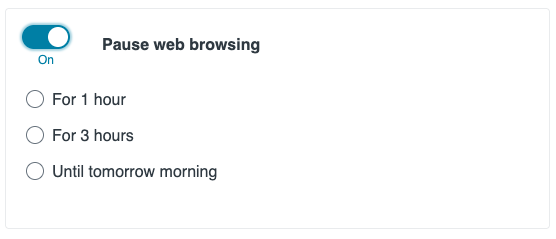
Pause Internet: You can pause web browsing for specific durations, such as 1 hour, 3 hours, or overnight (until 6:00 AM the following morning).
Create Schedules: You can set recurring internet access schedules to limit internet use during specific times, such as family time or bedtime.
Block Websites: You can block specific websites from being accessed during after-school hours.
Toggle Between Students: If you have more than one student at Wellesley Middle School, you can easily switch between their profiles using the drop-down menu at the top of the Parent Portal dashboard.
Yes. The district’s Lightspeed Filter will continue to automatically block inappropriate online content at all times, both at school and at home. The Parent Portal simply gives you additional oversight.
Yes. Lightspeed Systems strictly complies with student data privacy regulations, including FERPA and COPPA, and is recognized as compliant with the Student Data Privacy Alliance. Your student’s information remains strictly confidential and is never shared, sold, or distributed to third parties or advertisers.
No. Parent Portal controls (such as pausing internet access, setting custom schedules, or blocking specific sites) are only active outside of regular school hours. During the school day, the iPad remains under district management to ensure uninterrupted classroom learning.
No. The Lightspeed Parent Portal only manages your student’s district-issued iPad. It does not monitor or control personal cell phones, home computers, or overall home Wi-Fi network settings.
For questions, please call 781-446-6210 ext. 5439 or email 1to1coordinator@wellesleyps.org.