
What is Grackle Docs?
When you open a Google Doc, Sheet, or Slide, you can launch Grackle, a Google Add-on, to scan the document to determine if it meets accessibility requirements and to address any issues that it has identified. Grackle has been made available to all WPS staff.
How to Use Grackle in Google Docs?
- Open the file.
- Click Extensions from the menu options.
- Select Grackle Docs -> Launch.
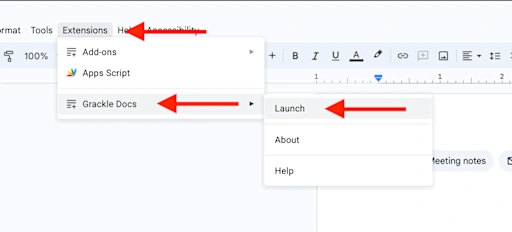
This will begin running the accessibility checker on your document. Results will be displayed at the top of the checker and you can scroll down to fix errors that were identified.
- Green check = Passed
- Green check with Exclamation = Passed with Warning
- Red X = Failed